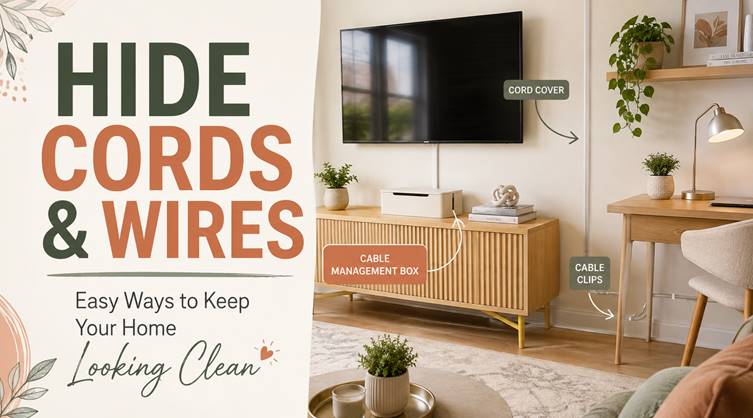
Nothing makes a beautifully decorated room feel unfinished faster than a bunch of visible wires.
TV cables hanging down the wall, chargers tangled beside the sofa, extension cords running across the floor, and router wires sitting in plain sight can easily create visual clutter.
The good news is that you do not need a major renovation to Hide Cords and Wires Around Your Home.
With a few simple organizers, cable covers, furniture tricks, and smarter placement, you can keep technology accessible without letting wires take over the room.
Here are some easy ideas that actually work.
1. Use Cord Covers Along the Wall
Cord covers are one of the simplest ways to manage visible cables.
They work especially well for TV wires, internet cables, lamps, and speaker cords.
Most cable raceways can be attached directly to the wall and painted to match your wall color.
Once everything blends in, the wires become much less noticeable.
For the cleanest look, keep the cable cover running in a straight line rather than placing it at random angles.
2. Hide TV Wires Behind the Wall
Wall-mounted TVs look great until several black cables are hanging underneath them.
If you want a really clean finish, consider routing the wires inside the wall.
This can work well for:
- HDMI cables
- TV power connections
- Soundbars
- Streaming devices
- Gaming consoles.
Depending on your setup, you may need an in-wall cable management kit or professional installation.
Always make sure any electrical work follows local safety requirements.
3. Use a Cable Management Box
Power strips are useful, but they are not exactly attractive.
A cable management box can hide the power strip along with several plugs and adapters.
Place one:
- Under a desk
- Behind the TV console
- Beside the sofa
- Near a charging station.
Choose a design that matches the surrounding furniture so it blends naturally into the room.
4. Attach Cables Behind Furniture
Sometimes the easiest way to hide cords and wires around your home is to simply move them out of your direct line of sight.
Use adhesive cable clips to attach cords behind:
- Desks
- Bedside tables
- TV stands
- Consoles
- Bookshelves.
This prevents cables from hanging loosely or falling onto the floor.
It also makes cleaning underneath furniture much easier.
5. Use Cable Sleeves for Multiple Wires
If several wires run in the same direction, bundle them together.
Cable sleeves can hold multiple cords inside one neat cover.
They are especially useful around:
- Computer desks
- Entertainment centers
- Gaming setups
- Home offices.
Instead of seeing five separate wires, you see one organized line.
You can find flexible sleeves, fabric covers, spiral wraps, and zippered versions depending on the look you prefer.
6. Create a Charging Drawer
Phone chargers have a way of appearing everywhere.
One on the kitchen counter.
Another beside the sofa.
Three more near the bed.
A charging drawer can keep everything in one place.
Use a drawer inside a console, kitchen cabinet, or bedside table and organize chargers using cable clips or small dividers.
If you are creating a built-in charging drawer, make sure there is proper ventilation and a safe power connection.
7. Use Furniture With Built-In Cable Management
When buying new furniture, look for pieces designed to handle wires.
Some modern desks, TV units, nightstands, and side tables include:
- Cable holes
- Hidden channels
- Built-in outlets
- USB ports
- Rear wire compartments.
These small design details can make a big difference.
They allow you to keep devices connected without having wires hanging across the furniture.
8. Hide Router and Modem Cables
Routers and modems often sit in very visible locations because they need access to power and internet connections.
Instead of stuffing them into a closed cabinet, use a ventilated shelf, a decorative box designed for electronics, or a small console.
Keep airflow around the devices and avoid blocking ventilation openings.
You can then use cable clips or sleeves to organize the remaining wires behind the furniture.
9. Run Cables Along Baseboards
If you have a long cable running across the room, try guiding it along the baseboard instead.
Small cable clips or paintable raceways can help secure it neatly.
This works well for:
- Ethernet cables
- Speaker wires
- Lamp cords
- Extension cables.
Running wires along architectural edges makes them far less noticeable than letting them cross an open floor.
10. Hide Lamp Cords Behind Furniture
Floor lamps and table lamps are common sources of visible cables.
Position lamps close to outlets whenever possible.
Then guide the cord behind the chair, console, nightstand, or sofa.
Adhesive clips can keep the cord tight against furniture legs or walls.
This simple trick can instantly make the room feel more polished.
11. Use a Cord Basket Under the Desk
Home offices usually have some of the worst cable clutter.
Laptop chargers, monitor cords, docking stations, phone chargers, and power strips all seem to meet underneath the desk.
An under-desk cable tray or basket can keep them off the floor.
Attach the tray underneath the desktop and place the power strip inside.
Then use cable ties to keep everything neat.
Your desk instantly looks cleaner, and you will have fewer wires around your feet.
12. Use Velcro Cable Ties
Velcro ties are inexpensive, reusable, and surprisingly useful.
Use them to bundle together extra cable length instead of letting it pile up behind furniture.
They work especially well for:
- Computer chargers
- TV cables
- Appliance wires
- Extension cords
- Gaming accessories.
Avoid tightening the ties too much.
The goal is organization, not bending or damaging the cable.
13. Turn an Empty Basket Into Cord Storage
Decorative baskets can hide more than blankets.
A basket placed beside a sofa or desk can discreetly hold:
- Extension cords
- Chargers
- Power adapters
- Spare cables.
Choose one with enough airflow and avoid placing hot electronic equipment inside a tightly enclosed basket.
For simple cable storage, though, it can be an attractive way to keep unused wires out of sight.
14. Hide Cords Behind Curtains
Curtains can help disguise wires running near windows or floor lamps.
Guide the cable down the wall behind the curtain panel and toward the nearest outlet.
Because the fabric already creates visual movement, the cord becomes much harder to notice.
Just make sure wires are not pinched or tightly wrapped inside the curtain.
15. Paint Cable Covers to Match the Wall
Sometimes hiding a cable completely is not practical.
In that case, camouflage it.
Paintable cord covers can be finished in the same color as your walls.
This works especially well in living rooms, bedrooms, and hallways where the cable must remain visible.
Once painted, the cover becomes part of the wall rather than something that draws attention.
16. Create a Hidden Power Station Inside a Cabinet
If you have several small devices, consider creating a power station inside a cabinet.
This could hold:
- Phone chargers
- Smartwatch chargers
- Tablet cables
- Power banks
- Camera batteries.
Use drawer organizers or small storage boxes to prevent everything from becoming tangled.
A dedicated charging cabinet can also help keep kitchen counters and bedside tables much cleaner.
17. Choose Wireless Options Where Practical
One easy way to reduce visible cords is simply to use fewer of them.
Wireless devices may help with things such as:
- Phone charging
- Keyboards
- Mice
- Speakers
- Headphones.
Of course, wireless products usually still need occasional charging.
But reducing the number of constantly connected wires can make a room look much cleaner.
18. Hide Extension Cords Behind a Console
Extension cords often become necessary when outlets are not located where you need them.
Instead of letting one stretch across the room, position it behind a console, bookshelf, or sofa.
Use cable clips to guide the cord along the wall.
If you need extension cords regularly, choose one that is appropriately rated for the devices you plan to connect.
19. Label Your Cables
This does not technically hide them, but it makes cable management much easier.
Use small labels to identify:
- TV
- Router
- Monitor
- Speaker
- Laptop
- Gaming console.
This becomes especially helpful when several cables are connected to the same power strip.
You will not have to unplug three things just to find the right cord.
20. Create a Cord-Free Looking Nightstand
Bedside tables can easily become cluttered with phone chargers, lamps, smartwatches, and other devices.
Use adhesive clips behind the nightstand to guide the cables.
You can also add a charging dock or wireless charging pad on top.
Keep excess cable length hidden behind or inside the furniture.
This creates a much calmer and more organized bedside setup.
Final Thoughts
Learning how to Hide Cords and Wires Around Your Home can make a surprisingly big difference to how organized your rooms feel.
You do not necessarily need to eliminate every cable.
The goal is simply to make wires less noticeable and easier to manage.
Use cord covers for visible wall cables, cable boxes for power strips, clips behind furniture, and sleeves for groups of wires.
A few inexpensive changes can take a room from messy and unfinished to clean, intentional, and much easier to live with.
And once your wires stop being the first thing you notice, the rest of your decor finally gets the attention it deserves.